

Loading ...
Skip to content
Thursday, January 29, 2026
  • About
myTechTrips

myTechTrips

MYTECHTRIPS.COM Website, we are dedicated to providing comprehensive digital tutorials for various services provided by CSC, BLS and more. Additionally, we offer technical blogs to provide solutions for common technical issues and keep you updated with the latest job openings in both government and non-government sectors.

  • CSC VLE
    • CSC Registration
    • IRCTC Registration
    • CSC DigiPay
      • Digipay Lite
      • Register Digipay on Computer
      • csc digipay lite commission 2023
      • DigiPay v7.3
      • Digipay lite id password kasie banaye
      • Digipay Micro Atm Booking Order Start
      • Digipay Install Kaise Kare 2022
    • IIBF Mock Test
      • RAP Mock Test – RAP Exam English
      • IIBF BC Exam Mock Test
      • IIBF CSC BC Mock Test
      • IIBF BC Exam
      • IIBF BC Exam Test
      • IIBF Business Correspondent Exam
    • CSC & HDFC Bank
    • CSC VLE Insurance
    • RAP Exam Questions
    • CSC Digipay Lite Margin
  • CSP – Bank Mitra
    • Bank Of Baroda
      • BOB CSP
      • BOB CSP Software
      • BOB CSP Browser Settings
      • BOB Kiosk Banking, BOB CSP, BC Commission chart 2021-22
    • State Bank Of India
      • SBI CSP – How to register sbi csp
      • SBI CSP
      • SBI CSP Commission Structure
    • Fino Payment Bank
      • how to apply fino payment bank csp
      • Fino CSP Lite Login
      • Fino Payment Bank CSP Login
    • Airtel Payment Bank
      • Airtel Payment Bank CSP
    • HDFC Bank
      • How To Apply For HDFC Bank CSC VLE || HDFC Bank Mitra || HDFC BC Point || HDFC CSP कैसे खोले
      • CSC & HDFC Bank
  • PAN Card Agent
    • UTI Pan Card Agent ID Registration
    • PAN Card Agent NSDL now is Protean
    • PAN CARD Agent Notice
      • PAN OPERATION CIRCULER NO 68 Revised PSA Coupon Charges
      • New inplementation in branch /PSA login w.e.f 18/03/2021
      • UTI Pan Agent NDA Format
  • PG
    • Payment Gateway
    • UPI Payments
  • Govt Schemes
    • LPG Gas Subsidy Check by mobile number
    • Atal Pension Yojana
      • APY PRAN Card Download Process
      • APY aadhaar seeding online
    • National Pension System
    • LPG Gas
    • Financial Advisor
      • National Pension System (NPS)
  • Other’s
    • Sports
    • Recharge Business Profit
    • The Tech Gadgets
    • Mobile & DTH Recharge API
    • Affiliate marketing
    • Loan Apps
    • UPI merchant Apps
    • Merchant UPI QR Code
    • Neo-Banking
    • Latter Format
      • Pan Card Affidavit For Date Of Birth
      • GST Registration Cancellation Letter Format
      • Application for Closing Bank Account
      • Application for Email Id Update in Bank – Top 10 format
      • Application for change bank account mobile number
      • Biodata For Job Application
  • Web Devolopment
    • Bootstrap 5 HTML5 Admin Template
    • Free HTML Admin Theme
  • Download
    • Epson Resetter
    • Epson Adjustment
  • Donate
site mode button

Bank Account-Aadhaar Linkage Application Form

Aadhaar Linkage Application Aadhaar Linkage Application Form Bank Account-Aadhaar Linkage Bank Account-Aadhaar Linkage Application Form
July 5, 2023July 5, 2023admin

Bank Account-Aadhaar Linkage Application Form


The Branch Manager,
________________ Branch Date: / /

Dear Sir / Madam,
Bank Account No. ……………………………………………………………… in my name Linking of Aadhaar / UID Number with the Account.
I am maintaining a Bank Account number ………………………………….…….. with your Branch. I submit my
Aadhaar number and voluntarily give my consent to :
О Seed my Aadhaar / UID number issued by UIDAI, Government of India in my name with my
aforesaid account.
О Map it at NPCI to enable me to receive Direct Benefit Transfer (DBT) from Government of
India in my above account. I understand that if more than one Benefit transfer is due to me,
I will receive all Benefit Transfers in this account.
О Use my Aadhaar details to authenticate me from UIDAI.
О Use my mobile number mentioned below for sending SMS alerts to me.
The particulars of the Aadhaar / UID letter are as under:
Aadhaar / UID number :…………………………………………………………………………………………………………
Name of the Aadhaar Holder as in Aadhaar card :………………………………………………………………….
I have been given to understand that my information submitted to the Bank herewith shall not be used
for any purpose other than mentioned above, or as per requirements of law.
Yours faithfully,


(Signature / Thumb impression of the account holder)
Name :………………………………………………………………………..
Mobile No. :………………………………………………………………..
Email :…………………………………………………………………………
Enclosure : copy of the Aadhaar letter self-attested.
…………………………………………………………………………………………………………………………………………………………………
Confirmation of insertion / linking of Aadhaar number with Bank account
The Account number ………………………………………………………. of Shri / Smt. ………………………….………………….
…………………………..with ……………………………………………………………Branch has been linked with Aadhaar /
UID number …………………………………………………………………… And mobile number ………………………………………
Date :………………………………………. (Bank’s authorized official)

B.C.L./B.C.W.(A)/M-5/ 10,000/16

Download PDF:

To link your bank account with Aadhaar, you can follow these general steps:

  1. Visit your bank: Go to your bank branch where you hold the account you want to link with Aadhaar.
  2. Collect the application form: Request the bank officials for the “Bank Account-Aadhaar Linkage Application Form.” They will provide you with the appropriate form.
  3. Fill out the form: Fill in the necessary details in the application form. This usually includes your bank account number, Aadhaar number, name, address, contact information, etc. Make sure to fill in the information accurately.
  4. Attach supporting documents: Along with the application form, you may need to attach self-attested copies of certain documents. These typically include a photocopy of your Aadhaar card and sometimes a copy of your PAN card or other identification documents. Check with your bank to confirm the required documents.
  5. Submit the form: Once you have completed the form and attached the necessary documents, submit them to the bank officials. They will verify the information and process your request.
  6. Acknowledgment receipt: After submitting the form, the bank will provide you with an acknowledgment receipt or reference number. Keep this receipt safe for future reference.
  7. Verification and linking: The bank will perform the necessary verification process to link your bank account with Aadhaar. This process may take some time, and the bank will inform you once the linking is complete.

To check the status of Aadhaar linkage with your bank account, you can follow these steps:

  1. Visit the official website of the bank where you hold your account. Look for the “Aadhaar Linkage” or “Aadhaar Seeding” section. Alternatively, you can also use the Aadhaar website or the UIDAI (Unique Identification Authority of India) website.
  2. Locate the option to check Aadhaar linkage or status. The specific name or location of this option may vary depending on the bank or website you are using.
  3. Enter the required details. Typically, you will be asked to provide your bank account number, Aadhaar number, and any other relevant information as requested.
  4. Submit the information. After entering the required details, click on the “Submit” or “Check Status” button.
  5. View the Aadhaar linkage status. Once you have submitted the information, the system will display the status of Aadhaar linkage for your bank account. It will indicate whether your bank account is linked with Aadhaar or if the linkage is still pending.
  6. Note down or print the confirmation. If your bank account is successfully linked with Aadhaar, make sure to note down or print the confirmation for your records.
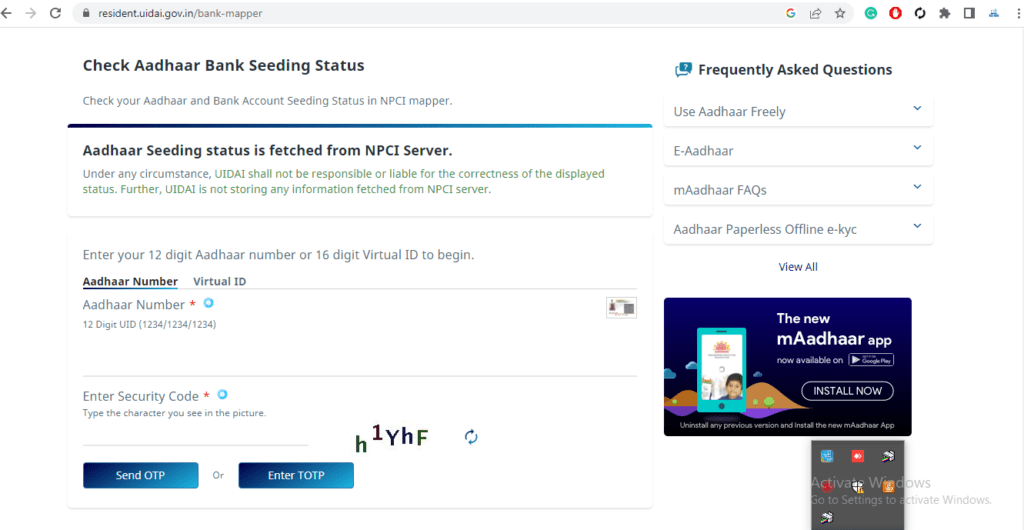
Aadhaar Seeding status is fetched from NPCI Server. https://resident.uidai.gov.in/bank-mapper

table contains:

  • CSC RAP Exam Questions And Answers 2023 PDF
  • Business Correspondents – कौन बन सकता है? – Axis Bank Through CSC
  • LAUNCH OF GOVERNMENT SALARY AND CURRENT ACCOUNT WITH SMARTHUB OPPORTUNITIES THROUGH CSC
  • CSC VLE Insurance Training And Certification
  • How To Apply For HDFC Bank CSC VLE || HDFC Bank Mitra || HDFC BC Point || HDFC CSP कैसे खोले
  • IRCTC Ticket Booking through CSC
  • LPG Gas Distributorship Registration Start Through CSC
  • The Ultimate Guide to UTI PSA Online Registration: UTI PAN Card Login!
  • UPIGateway
  • DigiPay v7.3

Following my social platform

Webwww.mytechtrips.com
Join telegram channelClick here
Join WhatsApp groupClick here
FacebookClick here
InstagramClick here
Youtube Channel 1Click here
Youtube Channel 2Click here
Tagged Aadhaar Linkage ApplicationAadhaar Linkage Application FormBank Account-Aadhaar LinkageBank Account-Aadhaar Linkage Application Form

Post navigation

Disable windows update
Top Trending Fashion Looks For 2023

Related Posts

Recent Posts

  • Anza Energy Football shoes
  • Anza Zomba football boots
  • Free recharge agent with high margin
  • Top 5 Free Responsive Bootstrap 5 HTML5 Admin Template
  • DarkPan – Free Bootstrap 5 Admin Dashboard Template
  • Sneat – Free Responsive Bootstrap 5 HTML5 Admin Template
  • Mazer – Free Bootstrap 5 HTML5 Admin Dashboard Template
  • KaiAdmin – Free Responsive Bootstrap 5 Admin Dashboard Template
  • DattaAble – Free Responsive Tailwind CSS Admin Template
  • QR Code Generator – Customizable QR Codes with Logo
  • Best Mobile Recharge API
  • Epson L405 Resetter (100% Working)
  • Epson L220 Resetter (100% Working)
  • Epson L360 Resetter (100% Working)
  • 6valley Multi-Vendor E-commerce
  • Active eCommerce CMS
  • WASender – Whatsapp server and bulk sender
  • Epson L3160 Resetter (100% Working)
  • Epson L3150 Resetter
  • Epson L3116 Resetter (100% Working)
  • Epson L3115 Resetter
  • Epson L3110 Resetter (100% Working)
  • Epson L380 Resetter (100% Working)
  • Download Epson L3210 Resetter Zip File
  • when do student loans resume

Popular Categories

Post

  • Anza Energy Football shoes
  • Anza Zomba football boots
  • Free recharge agent with high margin
  • Top 5 Free Responsive Bootstrap 5 HTML5 Admin Template
  • DarkPan – Free Bootstrap 5 Admin Dashboard Template
  • Sneat – Free Responsive Bootstrap 5 HTML5 Admin Template
  • Mazer – Free Bootstrap 5 HTML5 Admin Dashboard Template
  • KaiAdmin – Free Responsive Bootstrap 5 Admin Dashboard Template

Category

  • Top Payment Gateway
  • Epson Resetter Software
  • UTI Pan Card Agent Registration
  • PAN Card Agent NSDL now is Protean
  • Free HTML Admin Theme

Tags

Mobile Recharge API DTH Recharge API Gaming Monitor Payment Gateway AEPS Limit MSME NPS Gas Subsidy PSA Login PSA Id kaise le UTI RAP Mock Test CSC Hdfc Bank CSC CSC BC commission contact csc csp details digipay dth eshram exam fino full gateway gov hdfc head id iibf kumar lite login mobile pan payment payu psa recharge registration sbi spoc test update uti va vle wall

Links

  • Terms And Conditions
  • Disclaimer
  • Privacy Policy
  • Refund Policy
  • Sitemap
  • support@mytechtrips.com
Copyright @ 2024. www.mytechtrips.com All rights reserved. | Theme: News Portal by Mystery Themes.